
Table of Contents
Table of Contents
AutoMQ is a next-generation Diskless Kafka that is 100% compatible with the Apache Kafka protocol. By separating compute and storage and writing data to object storage such as S3, AutoMQ addresses cost, elasticity, and operational pressure in traditional Kafka architectures. In AutoMQ BYOC (Bring Your Own Cloud), both the control plane and data plane run in the customer's own cloud account and Virtual Private Cloud (VPC), and business data stays in the customer environment. That boundary makes data ownership clearer and means remote troubleshooting must be designed around customer authorization, data boundaries, and audit responsibility from the start.
1BYOC troubleshooting starts with low-intrusion authorization
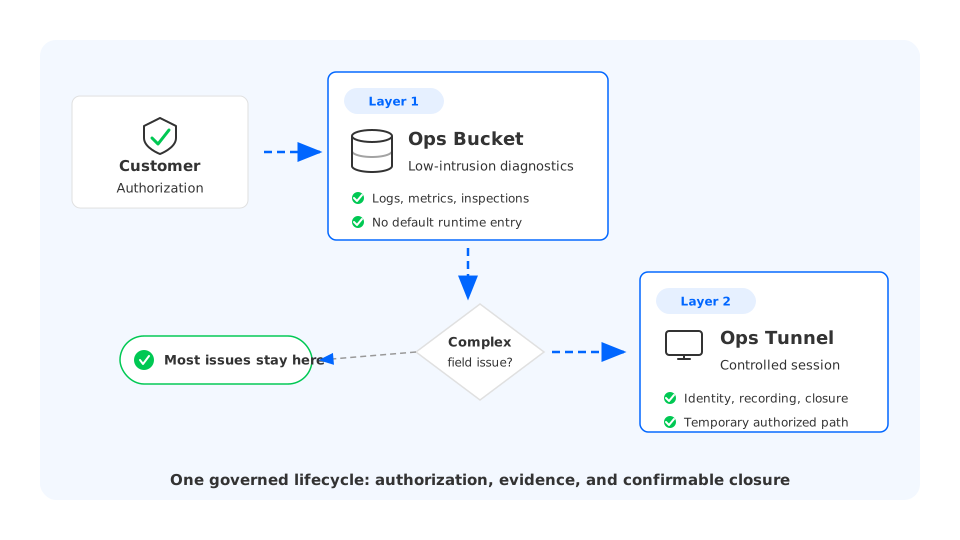
AutoMQ Cloud maintenance authorization starts with Ops Bucket authorization, a low-intrusion way to support operations and troubleshooting. The customer remains the bucket owner and grants AutoMQ service-side read and write permissions to a designated operations bucket. This bucket must be isolated from the business data bucket and other application buckets. It stores system logs, inspection logs, system metrics, subscription information, and version metadata, not customer business messages or other application data.
That authorization covers most day-to-day operational needs. AutoMQ's operations platform can use system logs, metrics, and inspection results for stability monitoring, self-healing maintenance, and initial issue diagnosis. For customers, this is a lightweight form of remote support: AutoMQ receives operational materials and system state without defaulting to interactive access into the runtime environment.
2Complex field issues need controlled interactive troubleshooting
Some Kafka and cloud-native infrastructure issues happen in the live runtime. Network connectivity may be abnormal, Kubernetes pod state may not match what the control plane shows, a component process may be unhealthy, local logs may not have been uploaded yet, or a mount path or object storage access path may need to be checked in place. In those cases, logs, metrics, and diagnostics from Ops Bucket may not be enough. Asking customers to repeatedly take screenshots, export logs, or run commands on behalf of support slows the investigation and loses context.
Ops Tunnel is designed for those complex cases. In AutoMQ's layered maintenance authorization model, Ops Bucket provides low-intrusion authorization for day-to-day operational materials, while Ops Tunnel handles deeper interactive troubleshooting in the field. After explicit customer authorization, AutoMQ BYOC Operator runs inside the customer environment and establishes a temporary access path only within the authorized scope. AutoMQ engineers troubleshoot through that controlled channel.
In AutoMQ BYOC deployments, the terminal is the interaction surface. The system still has to answer the governance questions around it: Did the customer authorize this access? Which engineer entered the terminal? Which customer environment did the session reach? Is the session recorded? Does access actually close when the authorization ends? If those records live only in tickets, chat messages, or manual approvals, the remote terminal becomes an invisible path around customer control and audit responsibility.
AutoMQ packages this field troubleshooting capability as Ops Tunnel, the BYOC maintenance channel. Remote troubleshooting moves from "can we open a terminal" to a lifecycle governed by authorization, routing, sessions, recording, and closure results. Once the channel is open, troubleshooting can move faster. More importantly, the customer and AutoMQ support team can evaluate the same system records: whether access was approved, how it happened, what evidence was retained, and when it ended.
A production-ready BYOC maintenance channel needs to preserve four types of records:
- Authorization: whether the customer enabled maintenance access, whether the authorization has expired, and whether the state is open, closing, or closed.
- Identity: which AutoMQ engineer entered the terminal and which customer authorization they used.
- Routing: which customer environment and customer-side runtime component received the terminal connection.
- Audit: when the terminal session started and ended, whether the operation record can be replayed, and whether closure completed.
These records cannot live only inside the terminal process. The terminal handles interaction, but it does not own customer authorization, and it is not the source of truth for what the customer sees in the console. The maintenance channel needs to open access from within the customer environment while keeping authorization, session, and audit records available to the systems that govern the workflow.
Around those four records, Ops Tunnel focuses on four design areas: authorization state, connection path, session audit, and closure confirmation.
2.1Turn customer authorization into system state
Once a remote terminal becomes a product capability, the state model usually shows up before the proxy mechanism. A customer starts or revokes authorization in AutoMQ Cloud. The maintenance workflow tracks customer authorization, terminal availability, session records, and closure requests. AutoMQ BYOC Operator starts or stops the local terminal entry point based on the authorization result. If the customer-side component restarts, the system can still recover the last authorization state and reconcile the local terminal entry point with it.
The model can be summarized as a simple chain:
Customer authorization
        ↓
Maintenance workflow checks authorization
        ↓
AutoMQ BYOC Operator opens a temporary terminal path
        ↓
Authorized AutoMQ engineer connects through a controlled channel
        ↓
Session audit and close result are recorded
The important part is aligning the authorization state with the execution result. AutoMQ records that a customer authorization allows a terminal to be opened. AutoMQ BYOC Operator reports that the temporary terminal entry point in the customer environment is ready under that authorization. The terminal endpoint should only become visible to the operations engineer when authorization state, access path, expiration, and execution result agree.
This state model also makes failures easier to explain. A tunnel may fail to open because routing is unavailable, because AutoMQ BYOC Operator has not completed the authorized action, or because the temporary terminal entry point failed to start. Turning those causes into explicit states is more useful than showing a generic "connection failed" message. Customers, SREs, and support teams can work from the same evidence instead of reconstructing the failure from separate logs and messages.
2.2Keep the connection path inside the customer boundary
In a BYOC architecture, the customer environment usually runs inside the customer's own VPC or Kubernetes cluster. A maintenance channel cannot assume that an AutoMQ external service can directly access internal customer services, and it should not require customers to expose a long-lived inbound endpoint for troubleshooting. A better model is for AutoMQ BYOC Operator inside the customer environment to establish a controlled access path that AutoMQ can use within the customer-authorized scope.
This channel owns reachability: it routes an authorized maintenance request to the right customer environment and customer-side management component. It does not own the maintenance authorization semantics, and it does not store session audit records. Authorization and audit remain part of the governed maintenance workflow; the channel itself focuses on secure routing.
That separation keeps the customer network boundary clear. The entry point is established by the customer-side component within the authorized scope. External systems do not get to treat the customer's private network as a default reachable zone. The same controlled management path can also support other operational needs, while the terminal layer adds customer authorization, identity verification, and session audit on top.
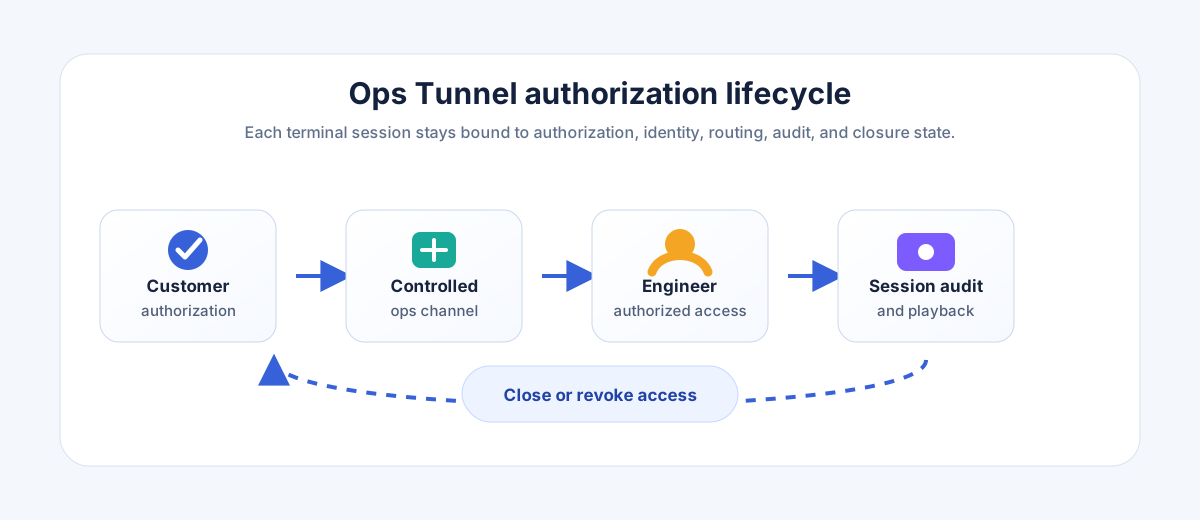
The important detail in this diagram is the channel boundary. This path is constrained by customer authorization and cannot be used around the control plane. AutoMQ validates the engineer identity, the workflow records the customer authorization state, and AutoMQ BYOC Operator handles only authorized access requests inside the customer environment.
2.3Make terminal operations replayable and auditable
Remote terminals differ from ordinary API operations because their activity is not naturally structured. API requests have request bodies, response codes, and audit events. A terminal session is a stream of input and output. Without recording, the system can only say that someone entered the environment, not what they ran, what they saw, or whether the session ended cleanly.
Ops Tunnel binds each maintenance connection to a session record. The system records whether the session was established, whether it closed cleanly, and why it failed when it did not. For customers, the value is not finer internal error codes. It is being able to see whether troubleshooting was authorized, whether the session actually started, whether the audit record exists, and where to continue investigation when something is incomplete.
The product needs a replay view for that reason. The screenshot below uses sanitized example data, but the shape is what matters: the session page keeps the maintenance context, the recorded terminal output, and the session identity in one place. An audit review does not see isolated terminal output; it sees shell activity tied back to an authorized maintenance workflow.
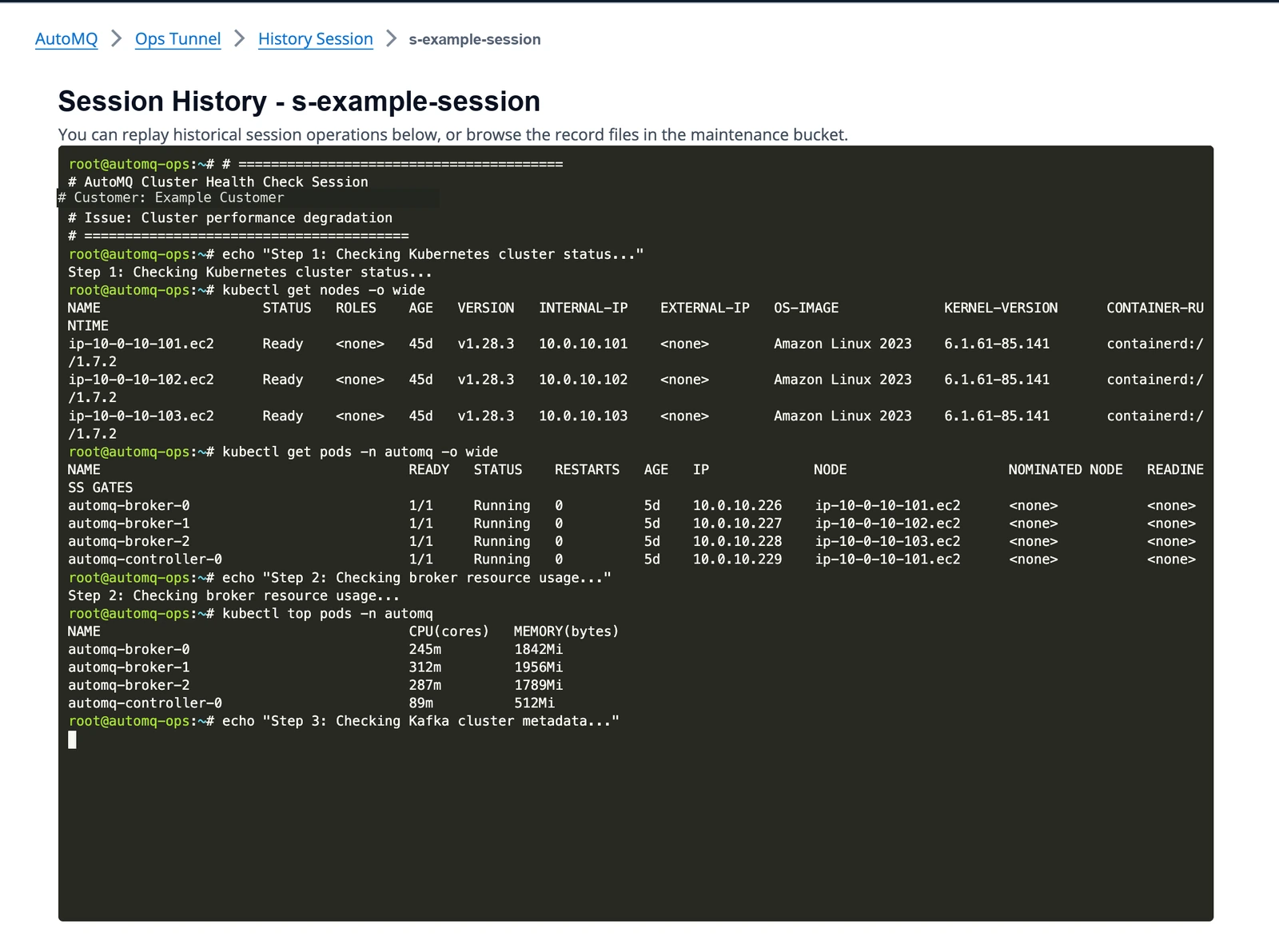
The recording is an audit artifact tied to both customer authorization and the terminal session. Playback should require the same authorization and session context, so access to a recording remains within the approved maintenance boundary. Access to recordings, retention, and sensitive-output handling should be governed by the customer's support and security requirements.
These records matter most after an incident. When a customer asks what happened during a maintenance session, the team does not have to reconstruct the answer from chat history or an engineer's memory. When SREs investigate why the page still shows an abnormal close result, they can inspect the maintenance session state and failure reason. When support teams see that the terminal opened but recording failed, they can narrow the issue to the audit path instead of treating every failure as a network problem.
2.4Make closure verifiable
Customers need evidence that access has actually ended. A disconnect button is not enough. If a page says authorization is closed while a connection remains active or a recording is not saved, the operational risk has only moved from the shell to the audit process. In production, closure should confirm three outcomes: the terminal connection stops, the session recording is saved, and authorization state is written back.
Ops Tunnel brings closure into the authorization lifecycle. When a customer ends authorization, the system records that access should close. The customer-side access entry point and session audit path then complete connection shutdown and recording persistence. If closure times out, the connection does not stop cleanly, or recording persistence fails, the customer and AutoMQ support team keep a concrete failure reason instead of relying on a vague closed or failed state.
Security review looks for confirmable results. Closure should not be a best-effort disconnect. The system can distinguish "the customer requested closure," "the connection has stopped," and "the audit record has been saved." The customer gets a confirmable end state for both access and evidence, which is the part that matters outside the implementation.
3Five risks to address when designing remote troubleshooting
Remote terminals can be implemented with many tools, but the most important BYOC choices are not about the tool itself. Terminal tooling handles interaction. Authorization, identity, audit, and closure state still need to be stored by the system. Ops Tunnel shows that an efficient, secure remote troubleshooting channel should identify the following risks and address them in the system design:
| Risk to identify | Possible issue | Design action |
|---|---|---|
| The customer did not explicitly approve this access | Maintenance access becomes an invisible path into the environment | Store authorization scope, expiration, and current state |
| The engineer identity is not traceable | The audit trail can only say that "someone entered" | Bind the engineer identity to the terminal session |
| The request did not land in the right customer environment | The channel is reachable but routing cannot be explained | Bind the customer environment, AutoMQ BYOC Operator, and access path |
| The operation history is not replayable | Audit depends on manual descriptions | Record terminal input and output, and bind the recording to the authorized session |
| Closure is not confirmable | The page closes while the connection or audit path remains unresolved | Record the closure request, close result, and failure reason |
This table is also the design checklist behind Ops Tunnel. It turns authorization, connectivity, identity, audit, and closure into risks that customers can evaluate through concrete control points.
An interactive terminal in a production system is rarely just a terminal. It is the use of a customer authorization and a controlled operation across a network boundary. Turning it into a product capability means the system can explain every step: why it can open, why it cannot open, who used it, where the record lives, and when closure completed.
If you are evaluating Apache Kafka operations for BYOC deployments, review both layers of capability: whether a low-intrusion authorization path such as Ops Bucket can support daily monitoring, log analysis, and version or license updates, and whether complex field issues can still be handled through a controlled, auditable, and confirmably closed interactive troubleshooting channel. For implementation details, see the Ops Authing overview and Ops Tunnel troubleshooting documentation. For deployment context, see the AutoMQ Cloud overview and the BYOC Kafka provider evaluation guide. You can also open AutoMQ Cloud to explore cloud-native Kafka deployment and operations.


