
Table of Contents
Table of Contents
Apache Kafka's exceptional performance and reliability as a distributed event streaming platform are largely attributed to its intelligent use of the operating system's page cache. This core design decision enables Kafka to achieve high throughput and low latency without requiring extensive application-level caching. This blog explores how Kafka leverages the page cache, its performance implications, configuration best practices, and common challenges.
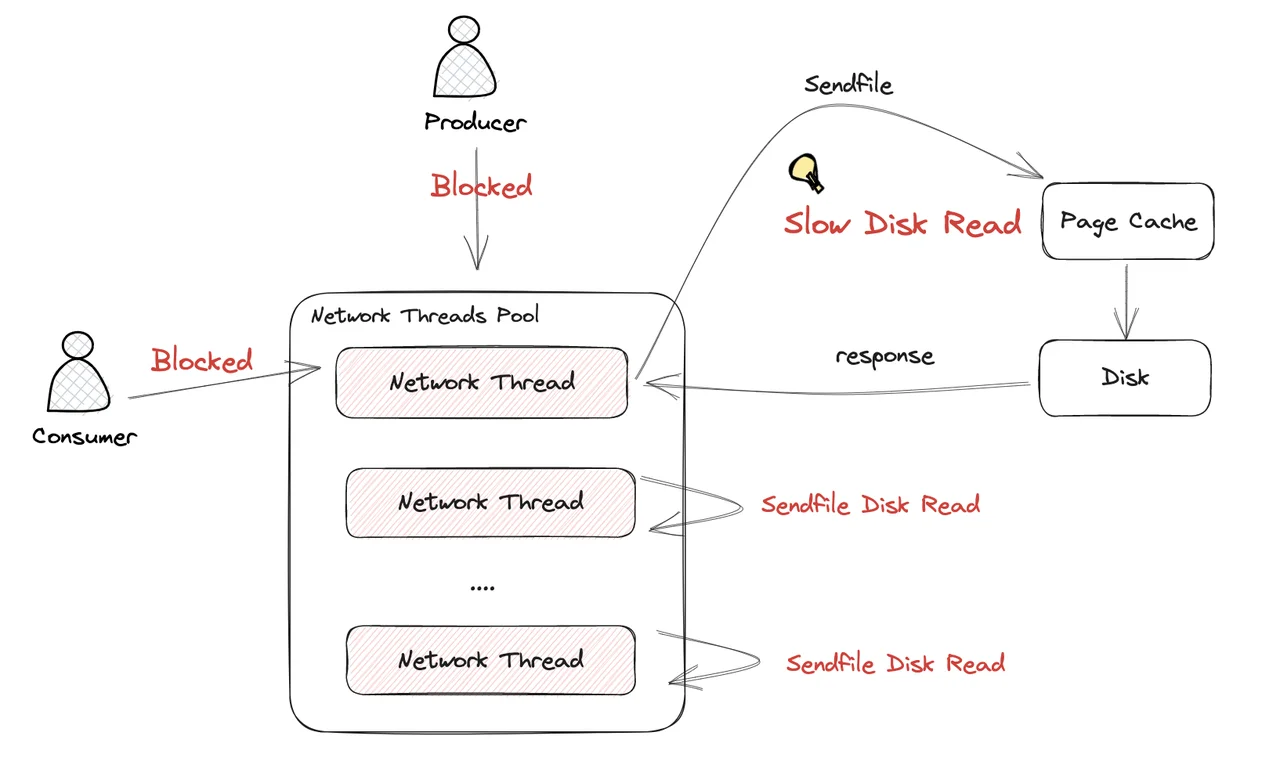
Although Kafka Page Cache brings many advantages to Kafka, it can cause serious performance issues due to Page Cache pollution when disk reads occur. If you are looking for a solution to this problem, you can read: How AutoMQ addresses the disk read side effects in Apache Kafka
1Understanding the Page Cache in Kafka's Architecture
The page cache is a transparent buffer maintained by the operating system that keeps recently accessed file data in memory. Kafka's architecture is specifically designed to take advantage of this system feature, rather than implementing its own complex caching mechanisms.
1.1Zero Copy Principle
At its core, Kafka operates on the "Zero Copy" principle, which is fundamental to its performance. This means:
-
Kafka transfers data in byte format without inspecting or modifying it
-
No data verification occurs at the cluster level
-
Data moves directly from disk to network (or vice versa) without unnecessary copying
This approach provides significant performance improvements compared to traditional methods that involve multiple data copies between channels. The zero-copy mechanism allows Kafka to avoid copying data into user space, reducing CPU overhead and improving throughput.
1.2How Kafka Utilizes the Page Cache
Kafka brokers make heavy use of the operating system's page cache to maintain performance. When data is written to Kafka:
-
Data is written to the page cache first
-
The OS eventually flushes these pages to disk asynchronously
-
Kafka doesn't explicitly issue commands to ensure messages are persisted (sync)
-
It relies on the OS to efficiently manage when data is written to physical storage
For reads, Kafka similarly leverages the page cache:
-
Consumer requests are served from the page cache when possible
-
The OS handles prefetching data through techniques like readahead
-
Sequential read patterns are automatically detected and optimized by the kernel
This approach differs from many databases that implement application-level caches. Kafka's reliance on the page cache is particularly effective because messaging workloads typically involve sequential reads and writes, which the Linux kernel has been optimized to handle efficiently.
2Performance Implications of Page Cache Usage
Kafka's page cache utilization directly impacts its performance metrics, particularly throughput and latency.
2.1Throughput Benefits
In benchmark tests, Kafka has demonstrated impressive throughput capabilities:
-
Achieving 200K messages/second or 200 MB/second on appropriate hardware
-
Performance scaling with increased disk throughput (from HDD to SSD to NVMe)
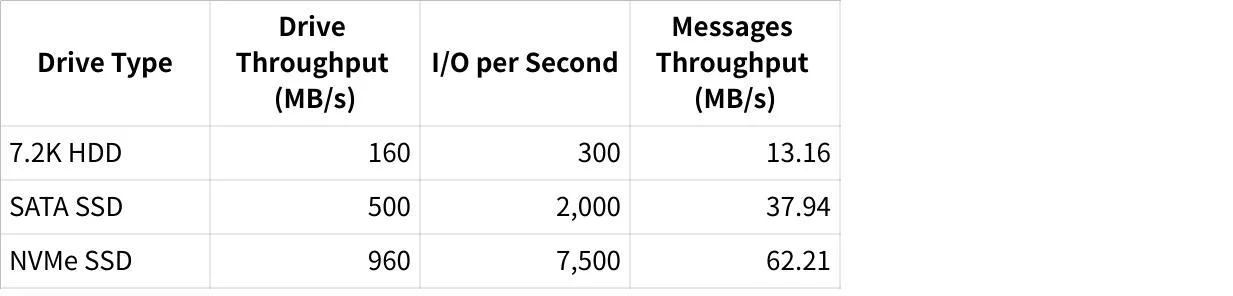
Table 1: Kafka performance scaling with storage technology (benchmark with 600M 100-byte messages)
2.2Latency Benefits
The page cache significantly reduces latency for Kafka operations:
-
Reads served from the cache have consistently low latency
-
When consumers keep up with producers, almost all reads come from the cache rather than disk
-
End-to-end latency can be kept in the millisecond range even at high throughput
3Configuring Systems for Optimal Page Cache Usage
To maximize Kafka's performance, proper system configuration is essential, particularly related to memory management and virtual memory behavior.
3.1Critical Linux Kernel Parameters
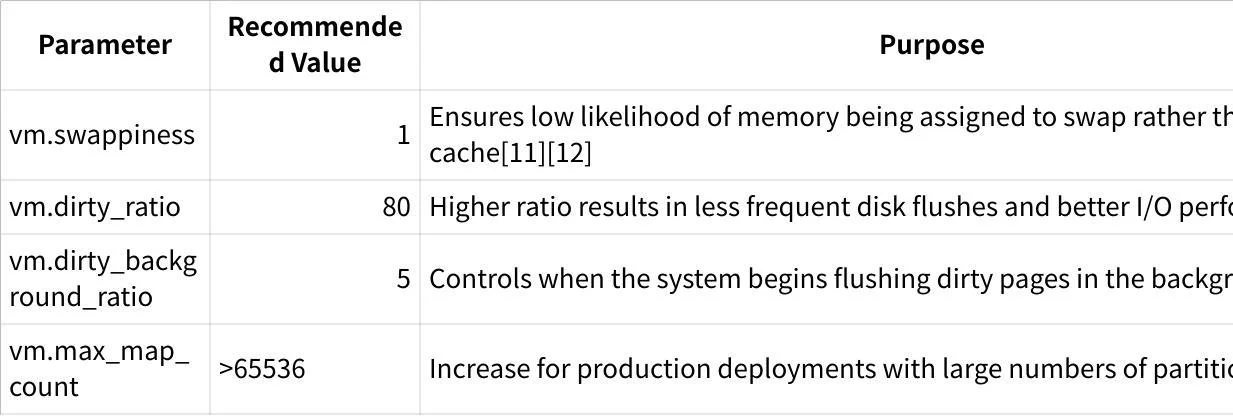
These parameters can be set persistently by adding them to /etc/sysctl.conf .
3.2Memory Allocation Considerations
For optimal Kafka performance:
-
Dedicated Resources : Run Kafka standalone on its own VM or physical server so available RAM is primarily used for page cache
-
JVM Heap Size : Configure the JVM heap size appropriately
-
Too large: Reduces memory available for page cache
-
Too small: Increases garbage collection overhead
-
-
Memory Mapping : Each log segment requires index files that need memory map areas
-
Production deployments with many partitions may exceed default OS limits
-
Increase
vm.max_map_countaccordingly
-
4Common Challenges and Solutions
4.1Running Kafka in Kubernetes
Kubernetes environments present unique challenges for Kafka's page cache utilization:
-
Shared Resources : In Kubernetes, the page cache is shared between multiple applications, meaning the amount of data Kafka can cache is never guaranteed
-
Resource Competition : When other applications run on the same node as Kafka, they can evict Kafka's data from the page cache
-
Pod Isolation : Kubernetes cgroups limit memory but don't provide isolation for page cache usage
Solutions:
-
Use node affinity/anti-affinity rules to isolate Kafka pods
-
Consider dedicated nodes for Kafka brokers
-
Implement resource limits that account for both heap and page cache needs
4.2Interference from Other Applications
When Kafka coexists with other disk-intensive applications, performance can degrade due to page cache competition:
-
Cassandra Co-location Issue : Running Cassandra alongside Kafka can increase page faults in Kafka pods even when memory resources appear available
-
Increased Disk I/O : More page faults lead to more writes to disk, hampering sequential I/O benefits and potentially depleting storage burst capacity
Solutions:
-
Isolate Kafka from other disk-intensive applications
-
Consider application-specific tuning (e.g., Cassandra uses
fadviseto optimize its page cache footprint) -
For AWS EBS or similar volumes, monitor burst balance carefully
5Best Practices for Kafka and Page Cache
5.1Hardware Recommendations
-
Storage Selection :
-
SSDs significantly outperform HDDs for Kafka workloads
-
NVMe drives provide even greater performance benefits
-
Higher drive throughput directly translates to higher sustainable message rates
-
-
Memory Sizing :
-
Allocate sufficient RAM for both JVM heap and page cache
-
General guideline: 32GB+ RAM for production Kafka brokers
-
More memory allows more data to remain cached
-
-
Network Configuration :
-
Ensure network bandwidth isn't a bottleneck
-
In test environments with 10Gb NICs, storage was typically the limiting factor
-
5.2Operational Recommendations
-
Monitoring Page Cache Efficiency :
-
Track cache hit ratios
-
Monitor disk I/O patterns
-
Watch for unexpected page faults
-
-
Scaling Considerations :
-
Scale horizontally when individual broker performance reaches limits
-
Add brokers when page cache pressure becomes too high
-
Consider partition reassignment to balance load across brokers
-
-
Maintenance Operations :
-
Schedule maintenance operations during low-traffic periods
-
Be aware that operations like partition reassignment can flush cache contents
-
Allow time for page cache to "warm up" after maintenance
-
5.3Swap Space Management
Despite common advice to disable swap entirely for Kafka, some research suggests that maintaining a small amount of swap can be beneficial:
-
Setting
vm.swappiness=1(not 0) allows the kernel to swap out truly inactive pages -
This can free up more memory for the page cache
-
Only completely unused applications or libraries get swapped, not active Kafka data
6Alternative Approaches: Beyond Page Cache
6.1Redpanda's Custom Memory Management
Redpanda, a Kafka-compatible streaming platform, uses a different approach:
-
Allocates RAM specifically for the Redpanda process instead of relying on the page cache
-
Implements hyper-efficient caching with buffers adjusted according to hardware performance
-
Uses Direct Memory Access (DMA) and aligns cache with the filesystem
-
Shares cache across all open files, allowing heavily used partitions to access additional buffer space during spikes
This approach potentially offers advantages in containerized environments where page cache behavior is less predictable.
6.2In-Memory Solutions
For specific use cases where extreme performance is required:
-
Some specialized systems use memory-mapped files to keep latency low
-
However, these require careful consideration of durability guarantees
-
May require fsync() calls to ensure data is persisted
7Conclusion
Kafka's intelligent use of the Linux page cache is a key architectural decision that enables its high performance and efficiency. By leveraging the operating system's existing mechanisms rather than implementing complex application-level caching, Kafka achieves impressive throughput and latency characteristics while maintaining reliability.
Proper configuration of both the operating system and Kafka itself is essential to maximize the benefits of page cache usage. This includes tuning Linux kernel parameters, allocating appropriate resources, and implementing operational best practices.
As workloads grow and environments evolve, particularly with the rise of containerization, understanding Kafka's page cache utilization becomes increasingly important. Whether optimizing existing Kafka deployments or considering alternative platforms like Redpanda, knowledge of how these systems interact with memory and storage is critical for achieving optimal performance.
Still struggling with skyrocketing Kafka bills and the "ops tax" of manual disk management? It's time to stop babysitting your clusters. Try AutoMQ Cloud for Free and experience how diskless architecture slashes costs and automates scaling—no credit card required. See how others made the switch in our case studies or explore the project on GitHub.


